





Description
IBLOG Smart Lock for Front Door - Keyless Entry Deadbolt with Fingerprint & Touchscreen Keypad, Auto-Locking, Smartphone App Control, Anti-Peek Passcode, Easy Installation for Home Security
View AllClose
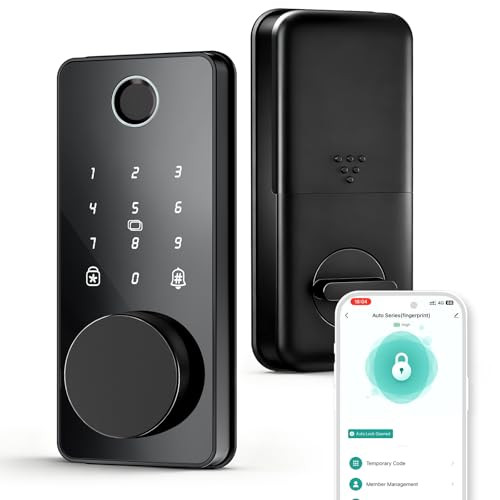
- 【Advanced Fingerprint Recognition】 Experience lightning-fast access with 0.3-second fingerprint identification and 0.5-second unlocking—ideal for keyless entry. The precise semiconductor sensor ensures accurate scans, while the auto-lock feature secures your door automatically after closure. Perfect for front doors, back doors, and high-traffic homes
- 【5-in-1 Keyless Entry Methods】 Unlock via fingerprint, touchscreen keypad (with anti-peek password protection), mechanical keys, Bluetooth app control, or IC fobs. Supports 100+ user codes and 100+ fingerprints, offering flexibility for families, Airbnb hosts, and offices. Note: Wi-Fi gateway sold separately
- 【Smart App Management & Real-Time Monitoring】 Control access remotely via the Tuya-based app: generate temporary, permanent, or one-time passwords for guests; review real-time access logs; and receive alerts for wrong password attempts. Syncs with smart home systems for integrated security management
- 【6-Layer Security Protection】 Features auto-locking, one-touch locking, wrong entry lockouts (5-minute lock after 5 failures), low battery alerts, and anti-peeking keypad technology. The zinc alloy body resists corrosion and drilling, while the emergency charging port ensures power backup during outages
- 【12-Month Battery & Easy Installation】 Powered by 4 AA batteries (included) with 10,000+ unlock cycles and 6–12 month lifespan. Enjoy DIY installation in under 10 minutes with a screwdriver—no electrician needed. Backed by 24/7 support, 1-year warranty, and 30-day return policy
- Download the Smart Life app to remotely control your IBLOG smart lock, create time-limited guest codes, get real-time entry alerts, set auto-lock timers (1-180s), and receive low-battery warnings—all with no subscriptions or hidden fees. Manage multiple users effortlessly. Works on iOS/Android. Setup in minutes.
- 【Important Installation Tip】To ensure a perfect fit and smooth operation of your smart lock, determine your door’s handing (left-handed or right-handed) in advance. Here’s a quick guide:Stand outsidethe door. If the hinges are on the left and the door pulls toward you (or the handle is on the right), it’s usually a left-handed door. If the hinges are on the right and the door pulls toward you (or the handle is on the left), it’s typically a right-handed door. For detailed illustrated instructions and step-by-step installation guidance, please refer to Pages 11-12 of the user manual. Confirming the handing beforehand helps avoid rework and ensures optimal performance.


